git-amend 유튜버의 6 Hidden C# Features Every Unity Developer Should Know 영상을 보니 괜찮은 기능들이 있어 정리해 보려고 합니다.
해당 영상은 아래 링크를 통해 확인 가능합니다.
1. Intelligent Logging
호출자 정보 어트리뷰트 CallerFilePath, CallerLineNumber, CallerMemberName 을 사용하여 로그에서 바로 어떤 함수에서 로그를 남겼는지 보여줄 수 있습니다.
호출자 어트리뷰트란 함수를 호출한 정보를 어트리뷰트에 알맞게 컴파일러가 알아서 넣어주는 기능입니다.
- CallerFilePath : 호출자의 소스 파일 경로
- CallerLineNumber: 호출자의 소스 파일 행 번호
- CallerMemberName: 호출자의 메소드 또는 프로퍼티 이름
어트리뷰트를 사용하면 아래 스샷과 같이 로그를 찍을 수 있습니다.

예시 코드는 아래와 같습니다.
public class TestIntelligentLog
{
    public void StartTest(string testMessage)
    {
        Log(testMessage);
    }

    public void Log(
        string message,
        [CallerFilePath] string file = "",
        [CallerLineNumber] int line = 0,
        [CallerMemberName] string member = "")
    {
        Debug.Log($"<color=green>[{Path.GetFileName(file)}:{line} - {member}]</color> {message}");
    }
}
2. Default Interface Methods
C# 8.0부터 생긴 기능으로 인터페이스에서 Default 함수를 구현할 수 있습니다.
자식 클래스는 Default 함수를 override 할지 선택해서 할 수 있으며, 하지 않았을 경우 interface 의 함수를 호출합니다.
다만 해당 인터페이스의 타입으로 선언했을 때만 사용할 수 있으며, 자식 클래스 타입으로 선언했을 때는 Default 함수를 호출하지 못합니다.
예시 코드는 아래와 같습니다.
public class TestDefaultInterfaceMethod
{
    public void StartTest()
    {
        //LoggerA
        {
            LoggerA loggerA = new LoggerA();
            //loggerA.Log("Halo 0");  Compile Error
            loggerA.LogWarning("Halo 1");
            loggerA.LogError("Halo 2");
        }

        //LoggerA as ILooger
        {
            ILogger loggerA = new LoggerA();
            loggerA.Log("Halo 0");
            loggerA.LogWarning("Halo 1");
            loggerA.LogError("Halo 2");
        }

        //LoggerB
        {
            LoggerB loggerB = new LoggerB();
            loggerB.Log("Halo 0");
            loggerB.LogWarning("Halo 1");
            loggerB.LogError("Halo 2");
        }

        //LoggerB as ILooger
        {
            ILogger loggerB = new LoggerB();
            loggerB.Log("Halo 0");
            loggerB.LogWarning("Halo 1");
            loggerB.LogError("Halo 2");
        }
    }

    public interface ILogger
    {
        void Log(string message)
        {
            Debug.Log(message);
        }

        void LogWarning(string message);
        void LogError(string message);
    }

    public class LoggerA : ILogger
    {
        public void LogWarning(string message)
        {
            Debug.LogWarning($"LoggerA : {message}");
        }

        public void LogError(string message)
        {
            Debug.LogError($"LoggerA : {message}");
        }
    }

    public class LoggerB : ILogger
    {
        public void Log(string message)
        {
            Debug.Log($"LoggerB : {message}");
        }

        public void LogWarning(string message)
        {
            Debug.LogWarning($"LoggerB : {message}");
        }

        public void LogError(string message)
        {
            Debug.LogError($"LoggerB : {message}");
        }
    }
}
3. Custom Numeric Format Strings
숫자를 ToString을 사용해서 문자열로 리턴 할 때 인자로 포맷을 넣어서 서식을 적용할 수 있습니다.
그 중 ;(세미콜론)을 이용하여 양수, 음수, 0에 따라 출력되는 문자열에 서식을 적용할 수 있습니다.
예시 코드는 아래와 같습니다.
public class TestCustomNumericFormat
{
    public void StartTest()
    {
        Log(123);
        Log(-456);
        Log(0);
    }

    public void Log(int value)
    {
        var format = "##;**##**;This is Zero!";
        var formattedValue = value.ToString(format);
        Debug.Log($"Value : {value} -> FormattedValue: {formattedValue}");
    }
}
4. Deferred Enumeration
특정 컬렉션에서 조건에 맞게 필터링하여 값들을 가져오고 싶을 때가 있는데 그때 값들을 컬렉션에 추가해서 바로 가져오는 대신 yield 와 IEnumerable 를 사용하여 지연적으로 가져올 수 있습니다.
이렇게 사용하면 컬렉션 생성으로 인한 메모리 사용을 방지할 수 있습니다.
예시 코드는 아래와 같습니다.
public void StartTest0()
{
    var scores = new List<int> { 50, 125, 300, 80, 170 };

    //Origin
    {
        Debug.Log("Origin-------");

        foreach (var score in GetBigValues(scores))
        {
            Debug.Log($"High score : {score}");
        }
    }

    //Deferred Enumeration 0
    {
        Debug.Log("Deferred Enumeration 0-------");

        foreach (var score in GetBigValuesWithDeferredEnumeration0(scores))
        {
            Debug.Log($"High score : {score}");
        }
    }

    //Deferred Enumeration 1
    {
        Debug.Log("Deferred Enumeration 1-------");

        foreach (var score in GetBigValuesWithDeferredEnumeration1(scores))
        {
            Debug.Log($"High score : {score}");
        }
    }
}

public List<int> GetBigValues(List<int> input)
{
    var result = new List<int>();
    foreach (var val in input)
    {
        if (val > 100)
        {
            result.Add(val);
        }
    }

    return result;
}

public IEnumerable<int> GetBigValuesWithDeferredEnumeration0(List<int> input)
{
    foreach (var val in input)
    {
        if (val > 100)
        {
            yield return val;
        }
    }
}

public IEnumerable<int> GetBigValuesWithDeferredEnumeration1(List<int> input)
{
    return input.Where(val => val > 100);
}
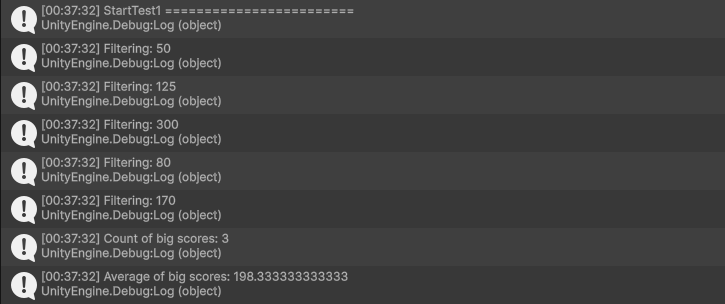
다만 주의해야 할 점이 있습니다.
아래와 같이 fitlered 변수에 linq를 사용하여 값을 넣어 코드를 작성하면 fitlered 가 호출될 때마다 컬렉션을 생성합니다.
public void StartTest1()
{
    Debug.Log("StartTest1 ========================");
    var scores = new List<int> { 50, 125, 300, 80, 170 };

    // 호출할때마다 생성함
    var filtered = scores.Where(val =>
    {
        Debug.Log($"Filtering: {val}");
        return val > 100;
    });

    Debug.Log($"Count of big scores: {filtered.Count()}");
    Debug.Log($"Average of big scores: {filtered.Average()}");
}
때문에 아래와 같이 캐싱해서 사용해야 컬렉션을 중복해서 생성하지 않습니다.
public void StartTest1()
{
    Debug.Log("StartTest1 ========================");
    var scores = new List<int> { 50, 125, 300, 80, 170 };

		//캐싱됨
    var filtered = scores.Where(val =>
    {
        Debug.Log($"Filtering: {val}");
        return val > 100;
    }).ToList();

    Debug.Log($"Count of big scores: {filtered.Count()}");
    Debug.Log($"Average of big scores: {filtered.Average()}");
}
5. Implicit and Explicit Operators
직접 정의한 클래스나 구조체를 다른 타입으로 형 변환하도록 구현해야 할 때가 있습니다.
C# 은 implicit(암시적), explicit(명시적) 변환 연산자를 통해 해당 기능을 구현할 수 있습니다.
implicit 은 자동으로 형변환 해주는 연산자이며, explicit 은 캐스팅을 통해 형변환 해주는 연산자 입니다.
예시 코드는 아래와 같습니다.
public void StartTest()
{
            //explicit
    HealthForExplicit health1 = (HealthForExplicit)100;
    int hp1 = (int)health1;

            //implicit
    HealthForImplicit health2 = 100;
    int hp2 = health2;
}

struct HealthForExplicit
{
    public int value;

    public HealthForExplicit(int v)
    {
        value = v;
    }

    public static explicit operator int(HealthForExplicit health)
    {
        return health.value;
    }

    public static explicit operator HealthForExplicit(int v)
    {
        return new HealthForExplicit(v);
    }
}

struct HealthForImplicit
{
    public int value;

    public HealthForImplicit(int v)
    {
        value = v;
    }

    public static implicit operator int(HealthForImplicit health)
    {
        return health.value;
    }

    public static implicit operator HealthForImplicit(int v)
    {
        return new HealthForImplicit(v);
    }
}
6. Array Slicing
C# 8.0부터는 .. 연산자와 ^연산자를 사용하여 배열의 특정 부분을 잘라낼 수 있습니다.
.. 연산자 : 범위를 가져올 때 사용합니다.
ex) 1..4 : 인덱스 1부터 3까지
^ 연산자: 배열의 끝에서 특정 인덱스까지 요소를 가져올 때 사용합니다.
ex) ^2 : 끝에서 두 번째 인덱스 요소
예시 코드는 아래와 같으며,
public void StartTest()
{
    int[] scores = { 10, 20, 30, 40, 50 };

    int last = scores[^1];
    Debug.Log($"last : {last}");

    int[] last3 = scores[^3..];
    Debug.Log($"last3 : {last3}");

    int[] first2 = scores[..2];
    Debug.Log($"first2 : {first2}");

    int[] mid = scores[1..4];
    Debug.Log($"mid : {mid}");
}
해당 변수들의 값들은 아래와 같습니다.

참고
https://www.youtube.com/watch?v=ToWaslg-Vws
https://learn.microsoft.com/ko-kr/dotnet/csharp/language-reference/attributes/caller-information
https://mentum.tistory.com/484
https://tech-interview.tistory.com/250
https://www.csharpstudy.com/latest/CS8-indexing-slicing.aspx
'Unity' 카테고리의 다른 글
| EditorWindow 안에 독립적인 SceneView 띄우기 (0) | 2026.04.14 |
|---|---|
| Unity Awaitable 을 Coroutine, UniTask 와 비교 (2) | 2025.01.04 |